BLAM 1.5.45 and higher require the user to capture pre-servicing and post-servicing pictures for all displays in stores that are serviced.
There is a bypass option provided for situations where pictures cannot be captured. This is intended to be used as needed, so don't abuse the feature.
To bypass instead of capturing a picture, follow these steps.
1. Select the dropdown arrow to view the display list. Select the one you want to bypass. Note that this process will need repeated for each display that you intend to bypass.
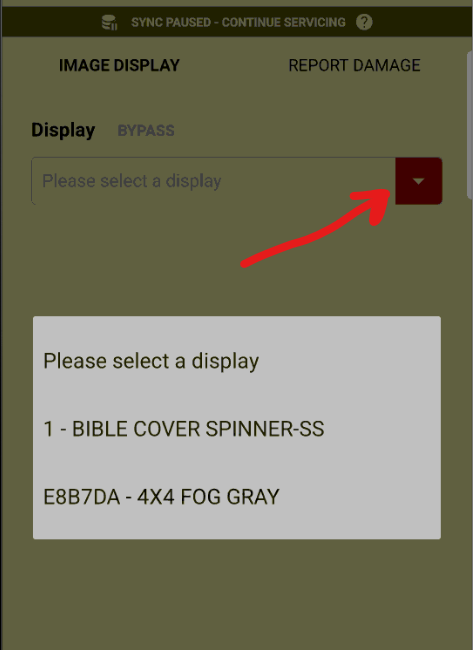
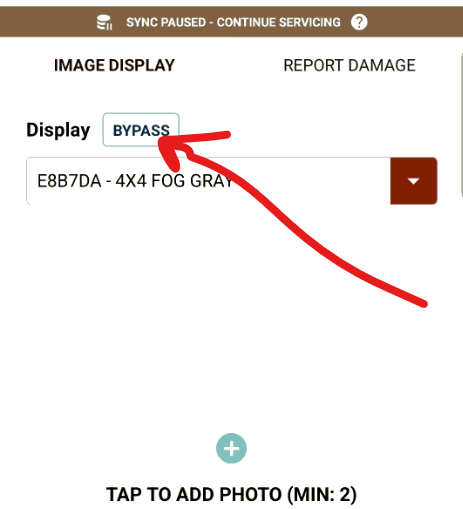
2. After you have the display selected, press the 'Bypass' button.
3. Then select a justification for the bypass from the drop down list.
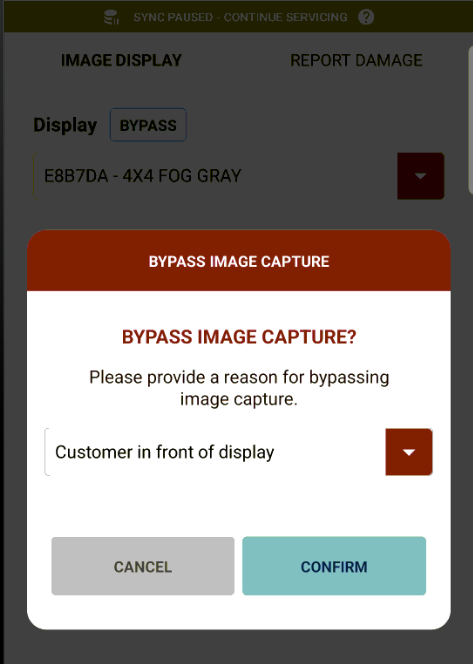
4. You have bypassed the picture requirement for that display. Don't forget that this process must be repeated for pre-servicing and/or post-servicing images for each display that you intend to bypass.
Was this article helpful?
That’s Great!
Thank you for your feedback
Sorry! We couldn't be helpful
Thank you for your feedback
Feedback sent
We appreciate your effort and will try to fix the article