There is logic built into BLAM to help identify IST titles that are allowed into each store.
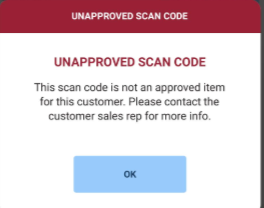
In the New Titles screen, scanning a barcode that has not been approved for a retailer has always presented this message:
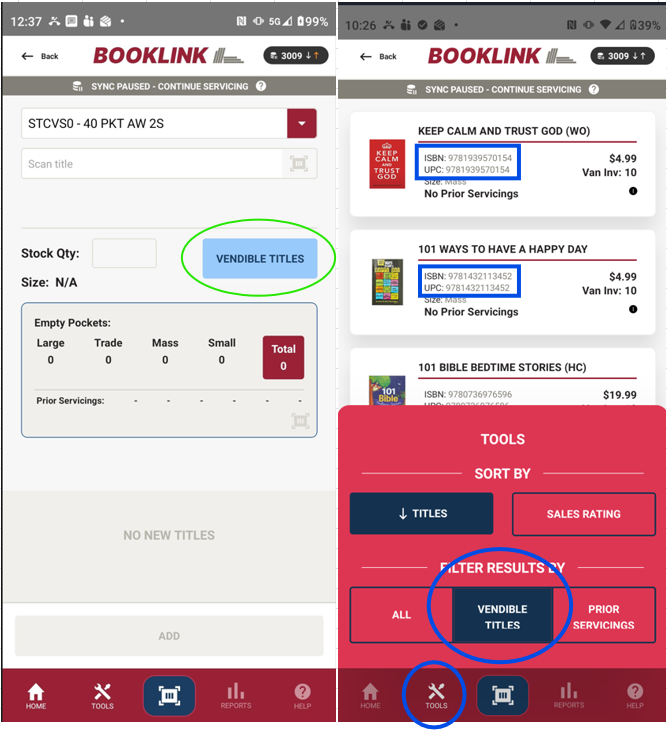
When there are 100's of items that are allowed or not allowed per store, it would be a waste of time to scan-and-scan trying to find one that is approved. The below Vendible Titles screen and filter will produce a list of items that are allowed. From this list, the rep can quickly find that title in the van and scan directly from that screen.
The Vendible Titles filter will only show items that are allowed for that retailer and there is quantity in the van.
ADDITIONAL NOTES AND CLARIFICATIONS
Vendible Items: Lists, Whitelisting, and the Vendible Titles Screen
The Four Retailer Lists
There are four main item lists that define which titles are available to which retail channels:
- M — Mass Merchandizers (e.g., Walmart, AAFES). This is the largest list; all items on the other lists are also on the M list.
- A — Airports
- S — Supermarkets and Drugstores
- H — Hospitals and Gift Shops
The A, S, and H lists are each smaller than M and vary from one another. A title may appear on multiple lists — for example, a 2028 Planner might be on M, S, and H — but will not necessarily be on all four.
Activation Lag Between Retailers
Each retailer processes and activates submitted titles at their own pace. Walmart may activate a new title within about a week, while Kroger can take months, and CVS falls somewhere in between. This means that even when all retailers on a list receive a submission on the same day, there will be ongoing variation in which titles are actually vendible to which stores. A title intended for every location will still have lag time where it's vendible to some retailers but not others.
Whitelisting (IST and MIX Stores)
When a retailer moves to IST or MIX status, "Customer Items Enforcement" is enabled. This means only items in that retailer's activated whitelist are deliverable. As a title is activated at a retailer, it is added to their whitelist in our Customer Items records. If a rep attempts to add a new title on the handheld that is not in the whitelist, they are blocked and notified that it is an "unapproved item."
Blacklisting via Servicing Rules
Items can also be blocked at a more granular level using Servicing Rules. For example, if Complete Guide to the Bible is on the S list but a specific supermarket chain (e.g., Giant Eagle) requests its removal, that title can be blacklisted for that chain only — without removing it from the S list entirely.
The Vendible Titles Screen (New Titles screen in BLAM 1.5.45 and higher)
The Vendible Titles screen is an addition to the existing tools, not a replacement for them. The existing process remains fully intact: reps can still browse their van, scan items to add as new titles, and the handheld will display the "Unapproved Item" message as a guardrail if a scanned title isn't activated at that retailer.
The new Vendible Titles screen gives reps a browsable, pre-filtered list of titles that are:
- Activated at that retailer
- Not already on the display
- Present in the van inventory
The purpose is to let reps browse known good options on the handheld rather than pulling books from the van to scan and discover whether they're approved. Think of it as a shopping list to start from, not a tool to double-check a specific title. If a rep already knows a title is an option, there's no need to consult the list at all.
This screen will become increasingly useful as more IST retailers are added and new titles continue to roll out — especially given the retailer-by-retailer variation in activation speed described above.
To summarize: reps can continue working exactly as they do today and the handheld will catch any unapproved titles. The Vendible Titles screen is simply an additional tool to help them work more efficiently.
Was this article helpful?
That’s Great!
Thank you for your feedback
Sorry! We couldn't be helpful
Thank you for your feedback
Feedback sent
We appreciate your effort and will try to fix the article